headless-macs
Configure an Apple Silicon Mac as a production-grade LLM inference node — all from a single interactive TUI binary.
v2.2.0 replaces the bash pipeline with a Go binary (headless-macs) that runs precheck, storage setup, system baseline, tool installation, health check, restore, and update — interactively via TUI or non-interactively via CLI subcommands. The shell scripts remain in the repo for reference but are no longer maintained.
Supported tools: Ollama · Rapid-MLX · mlx-lm · Infinity · Exo
Requires: Apple Silicon (M1 or later) · macOS 15 Sequoia or 26 Tahoe · Homebrew · Go 1.22+
Security scope — this is a home-lab / trusted-network tool. Every serving daemon here (Ollama, Rapid-MLX, mlx-lm, Infinity, Exo, macmon) binds plain HTTP with no built-in authentication or TLS, and
headless-macsdoes not add either. That’s a reasonable fit for a Mac serving models to other machines on your own private LAN — the documented, intended use case — but nothing here is safe to expose to the public internet or an untrusted network as configured. Fronting the stack with a reverse proxy (Caddy is the leading candidate — automatic TLS, trivial config) is a real, tracked gap, not yet built — seeFUTURES.mdfor the design sketch.
Quick Start
# 1. Clone
git clone https://github.com/miha42-github/headless-macs.git
cd headless-macs

# 2. Build the binary
go build -o headless-macs ./cmd/headless-macs

# 3a. Interactive TUI — first launch copies config.json to /etc/headless-macs/config.json
sudo ./headless-macs

# 3b. Or non-interactively (headless/SSH/cron)
sudo ./headless-macs precheck
sudo ./headless-macs baseline
sudo ./headless-macs install-tools
sudo ./headless-macs verify
Interactive TUI
A persistent sidebar on the left lists every function (d Dashboard, c
Edit Config, p Precheck, t Storage Setup, b System Baseline, i
Install Tools, v Verify, r Restore, u Update Tools, q Quit) — it
stays visible while the content pane on the right shows whatever you’ve
selected. Below about 70 columns the sidebar collapses to an icon-only
rail so the content pane keeps most of the width.
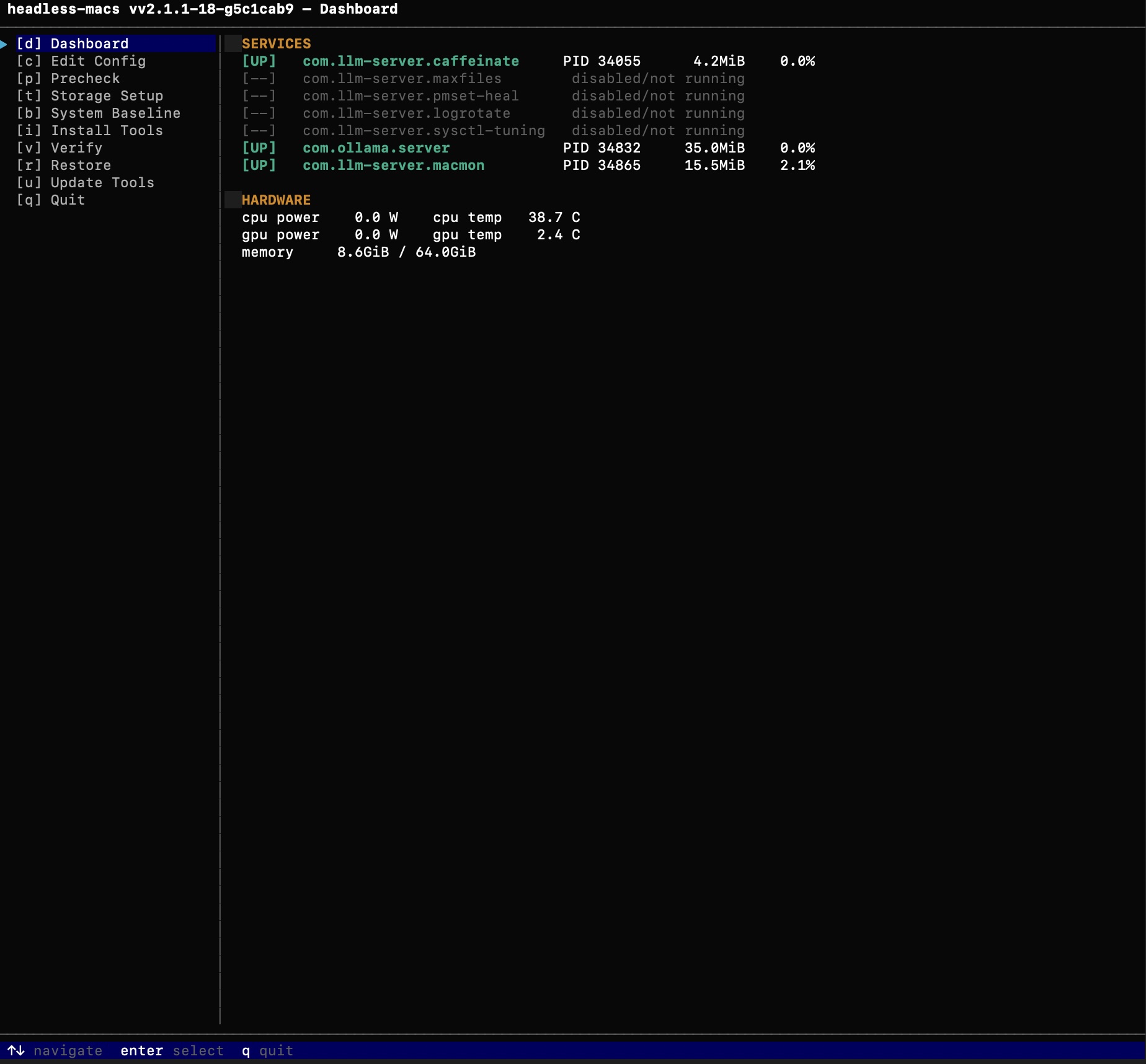
Dashboard (d, and the default view on launch) shows what’s actually
running right now — every managed daemon’s state, PID, memory, and CPU%,
plus live hardware telemetry (CPU/GPU power, temperature, memory) when
tools.macmon is enabled. It refreshes on an interval set by
tui.dashboard_refresh_ms in config.json (default 2000ms), and
surfaces a nudge if this box was last configured by a different version
of the binary than the one currently running, naming the command to
re-run.
Recommended run order the first time:
| Step | Sidebar key | What it does |
|---|---|---|
| 1 | p |
Precheck — read-only audit, no sudo needed |
| 2 | c |
Edit Config — enable tools, set storage options |
| 3 | t |
Storage Setup — external volume (if enabled) |
| 4 | b |
System Baseline — pmset, sysctl, services, SSH |
| 5 | i |
Install Tools — daemons for enabled tools |
| 6 | v |
Verify — health check of everything installed |
Press q from any content pane to return to the Dashboard; q again (or
selecting Quit from the sidebar) exits the app.
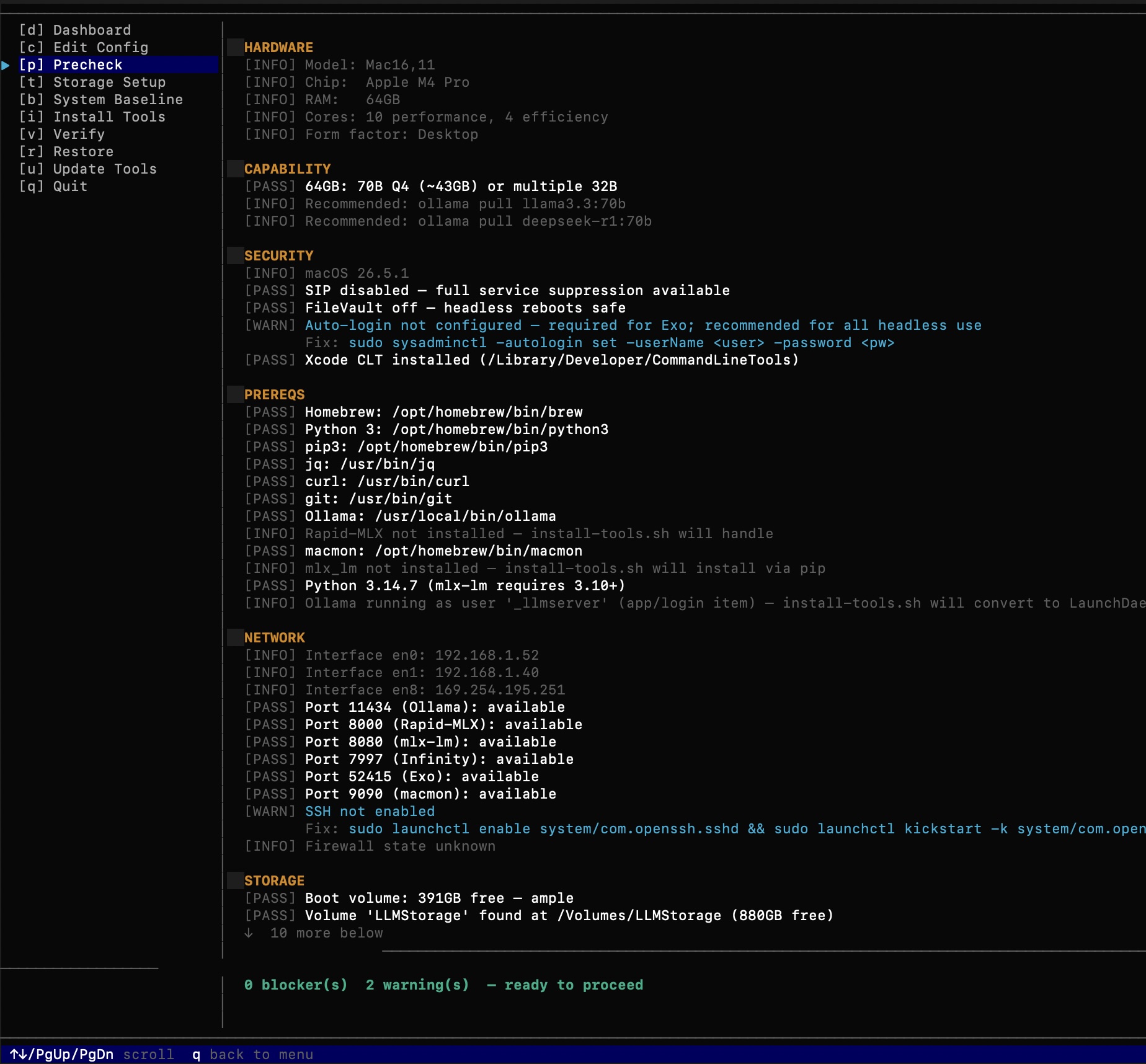
Precheck identifies hardware capability, security posture, prerequisites, and network readiness before any changes are made:
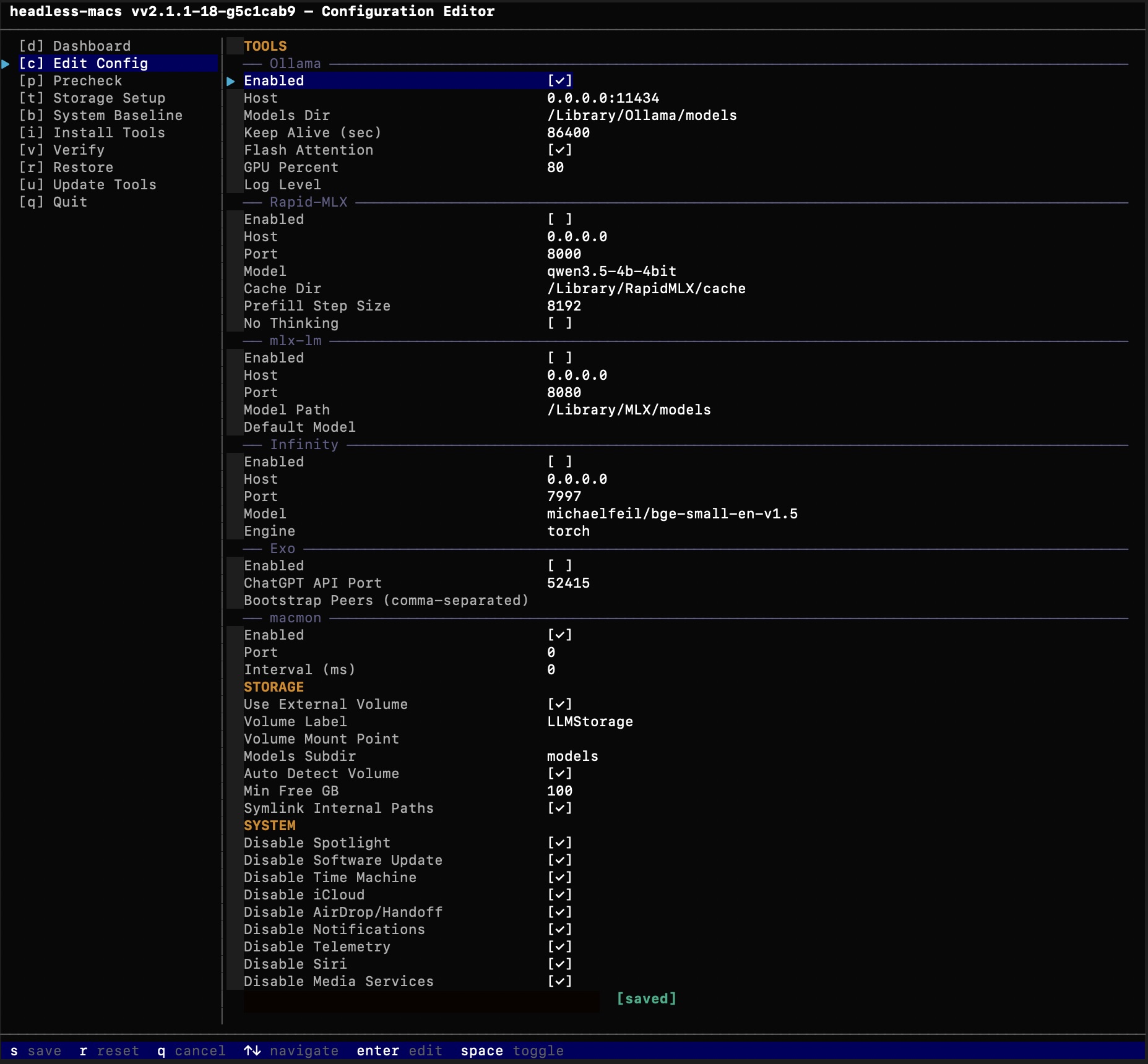
Edit Config exposes every tool’s settings — including the newer
macmon telemetry toggle and the Dashboard’s own refresh interval —
without hand-editing config.json:
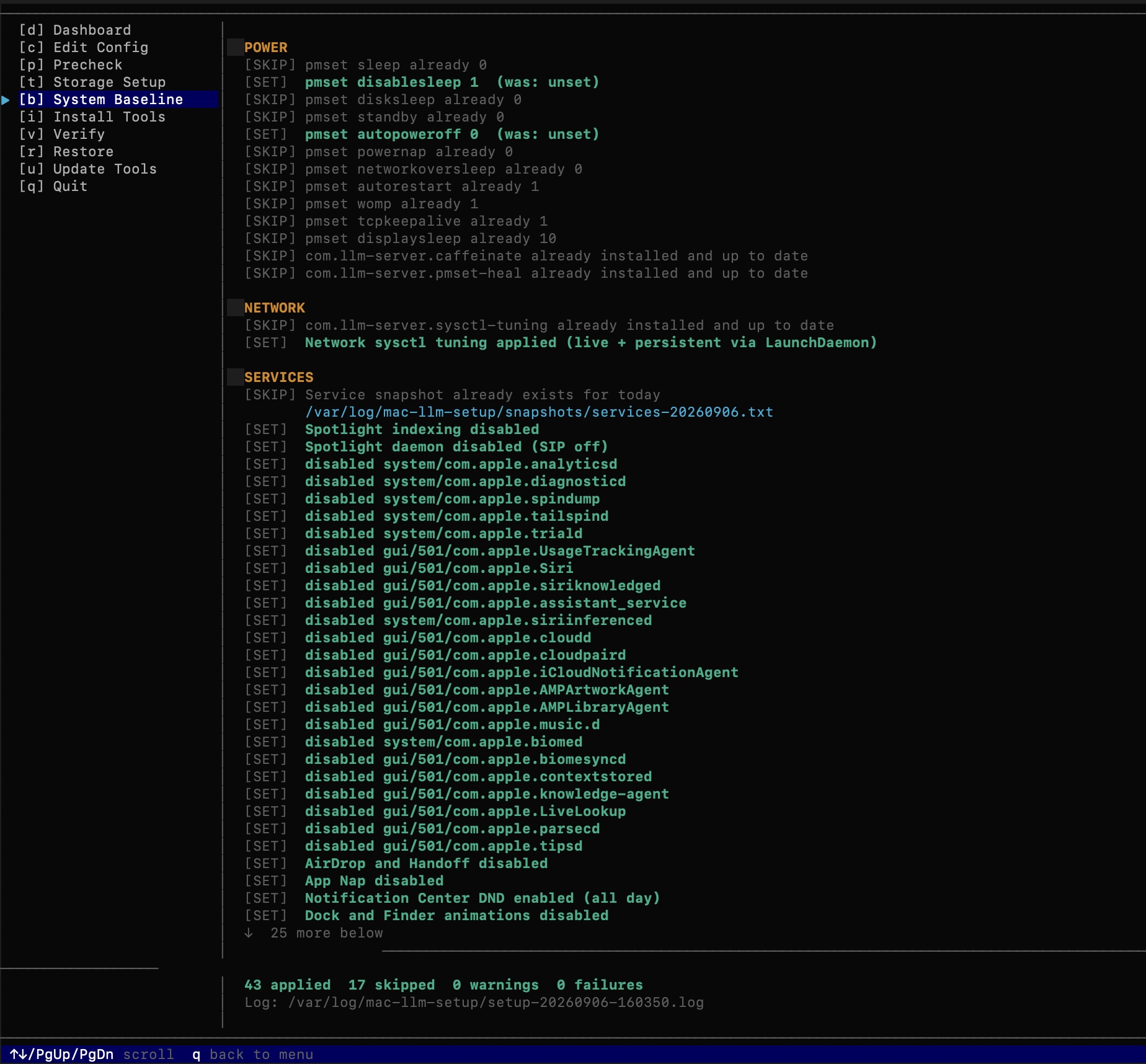
System Baseline applies pmset, sysctl, service-suppression, and SSH settings, reporting exactly what changed and what was already correct:
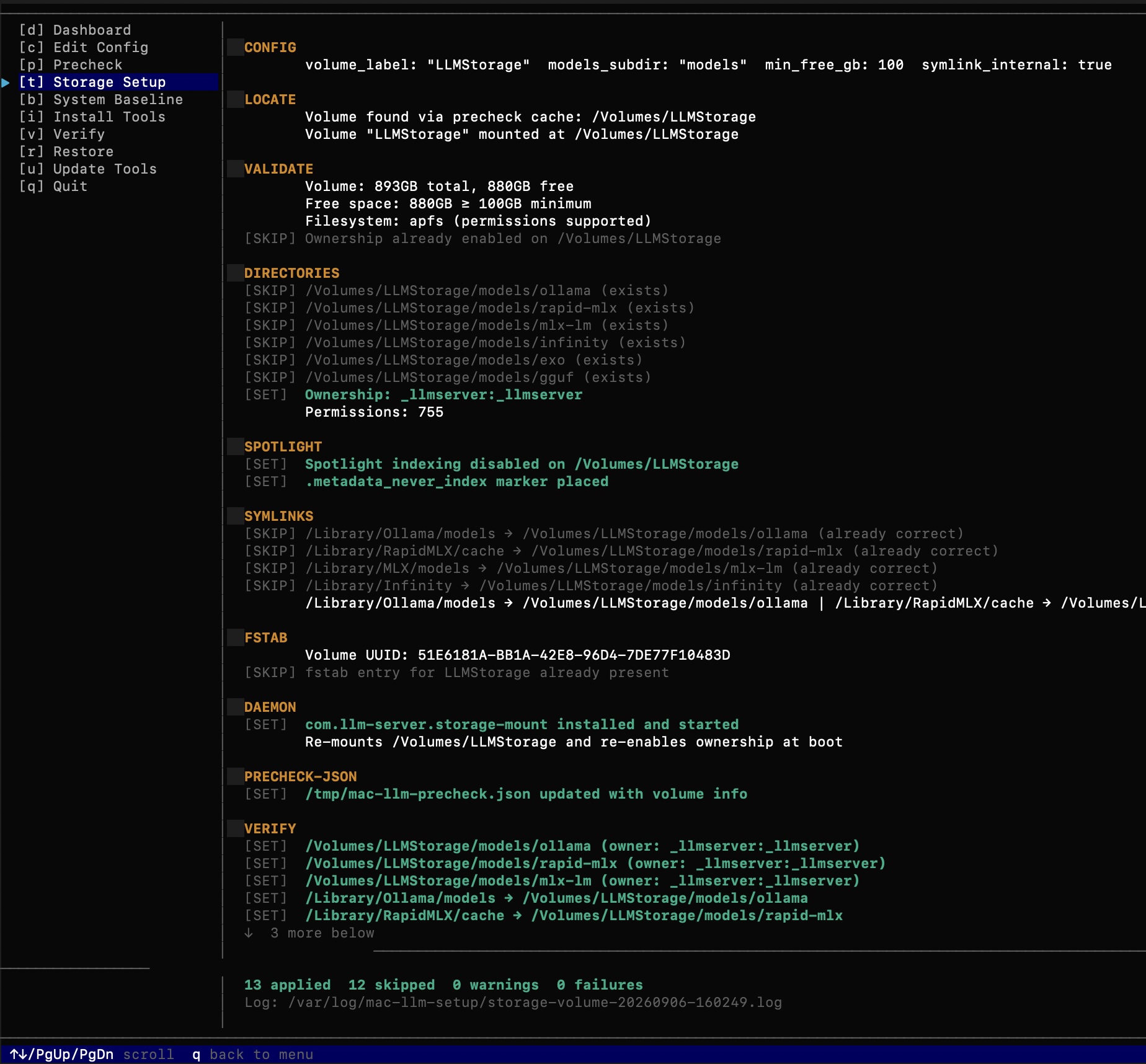
Storage Setup locates, validates, and wires up an external volume for model storage — ownership, symlinks, fstab, and a re-mount LaunchDaemon:
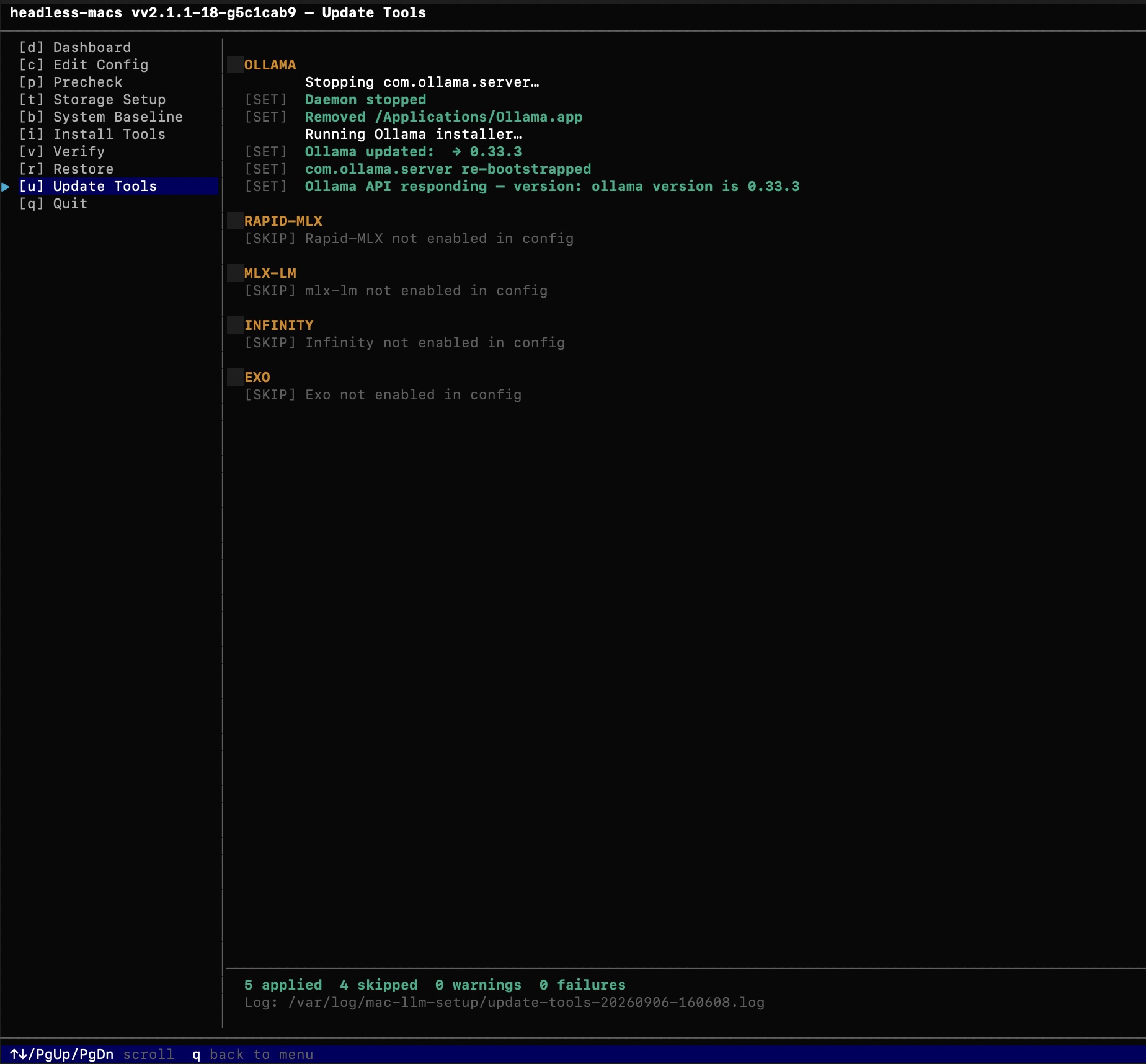
Update Tools upgrades each enabled serving tool’s binary in place and re-verifies its API responds afterward:
Headless / CLI mode
Every TUI function except Edit Config is available as a subcommand for scripting, cron, or remote SSH automation — there’s no CLI flag for changing config values (that’s what config.json/the TUI editor are for), just for running the operations themselves:
| Sidebar key | Function | CLI equivalent |
|---|---|---|
d |
Dashboard | status (--watch for the same live refresh) |
p |
Precheck | precheck |
t |
Storage Setup | storage |
b |
System Baseline | baseline |
i |
Install Tools | install-tools |
v |
Verify | verify |
r |
Restore | restore |
u |
Update Tools | update-tools |
x |
Debugging Tools | debug-tools |
c |
Edit Config | (none — edit config.json directly, or use the TUI) |
Besides status --watch, no subcommand takes any flags beyond the global --help/--version/--config — nothing here is configurable from the command line itself:
sudo headless-macs precheck        # Read-only audit — no changes
sudo headless-macs baseline        # Apply system settings (pmset, sysctl, SSH, daemons)
sudo headless-macs install-tools   # Install/configure serving stack
sudo headless-macs verify          # Health check
sudo headless-macs update-tools    # In-place binary upgrades
sudo headless-macs storage         # External volume setup
sudo headless-macs restore         # Undo everything
sudo headless-macs status          # What's running and what it's costing you
sudo headless-macs status --watch  # Same, refreshing in place (same interval as the TUI Dashboard)

sudo headless-macs --help                        # Show all commands and options
sudo headless-macs --version                     # Print version and exit
sudo headless-macs --config /path/to/config.json verify  # Use an alternate config file for one invocation
--config works anywhere in the argument list, with any subcommand (or none, for the TUI) — it overrides the default /etc/headless-macs/config.json for that one invocation only; it’s not a standing setting.
Every CLI invocation also prints a one-line [INFO] to stderr if this
box was last configured by a different version of the binary than the one
currently running — the same nudge the Dashboard shows.
Output uses the same [SET]/[SKIP]/[WARN]/[PASS]/[FAIL] prefix convention as the v1 shell scripts, teed to /var/log/mac-llm-setup/. Exit codes: 0 = success, 1 = failures, 2 = warnings only.
Debugging Tools
headless-macs-debug is a small, separate binary for pulling logs off a node without needing the full TUI — installed alongside headless-macs itself, not a subcommand of it. Install/update it via x in the TUI sidebar or sudo headless-macs debug-tools.
sudo headless-macs-debug logs                 # rotate + bundle every managed tool's logs
sudo headless-macs-debug logs ollama          # same, narrowed to one tool (ollama, rapid-mlx, mlx-lm, infinity, exo, macmon)
sudo headless-macs-debug logs ollama --keep=5 # keep more rotation history per stream (default 2)
sudo headless-macs-debug clean                # delete every bundle under bundles/, freeing the space they use
Each run forces an out-of-cycle rotation using the same shared logrotate config install-tools already writes (nothing new to configure), then bundles the result into a timestamped tar.gz under /var/log/mac-llm-setup/bundles/ and prints its path. Pulling it off the box is a plain scp — this tool never pushes anywhere itself. Only the live log file plus its --keep (default 2) most recent rotations are bundled per stream (stdout/stderr) — not each tool’s entire rotation history, and not headless-macs’s own operational logs under /var/log/mac-llm-setup/ (an earlier version bundled both, producing bundles far larger than the actual source logs). clean is a plain, non-interactive delete — no confirmation prompt, no automatic retention policy; it removes everything under bundles/ every time it’s run.
Testing status: the full flow — rotate, bundle, sudo NOPASSWD over non-interactive SSH,
scpoff the box — is live-verified end to end forollamaonly. The other five tools’ log directories (rapid-mlx,mlx-lm,infinity,exo,macmon) are structurally identical, but haven’t been exercised live since they aren’t enabled on the boxes this was tested on. Treat those as untested, not broken, until confirmed.
Debug sessions: start, stop, mark
sudo headless-macs-debug start ollama   # put ollama into debug-level logging, rotate, restart
sudo headless-macs-debug stop ollama    # back to standard logging, restart, rotate again

sudo headless-macs-debug mark ollama --start   # append a timestamped marker to stdout.log/stderr.log
sudo headless-macs-debug mark ollama --stop    # same, for the other end of whatever you're marking

sudo headless-macs-debug mark ollama --start load test run 4   # optional trailing note in the marker
start/stop edit exactly one key (OLLAMA_DEBUG) in the daemon’s existing LaunchDaemon plist in place — via PlistBuddy, leaving every other setting untouched — then restart the daemon, since EnvironmentVariables are only read once at process start. start rotates the logs before restarting, so the debug session begins in a fresh file; stop restarts first and rotates after, so the complete session gets archived into its own rotation before quiet logging resumes. stop exits with a plain status code — nothing else, no bundle path — pull the archived logs off with logs ollama yourself afterward if you want them.
mark takes an optional trailing message — every word after --start/--stop is joined with spaces and included in the marker line — useful for telling apart several marked runs in the same log file.
Currently supported for start/stop: ollama only. The other tools toggle verbosity through a different mechanism (a --log-level CLI argument, not an environment variable) or have no verbosity toggle at all yet — see docs/planning/PHASE_13_PLAN.md for the detail.
Running sudo headless-macs install-tools while a debug session is active reverts the toggle — install-tools always regenerates the plist from config.json, which is expected, not a bug. start prints a note about this each time.
mark is fully independent of start/stop — it never gets called automatically by either, and works for any of the six tools (it only needs the tool’s log directory, which all six have) even though start/stop don’t yet. Use it to bound whatever you’re currently doing in the logs without needing a daemon restart at all. Appending to a log file the daemon is also actively writing to is safe — POSIX guarantees a single write to an append-mode file descriptor can’t be torn or interleaved with another process’s concurrent write, the same guarantee tools like logger(1) and syslog rely on.
Passwordless sudo — an explicit escalation you opt into
headless-macs-debug logs needs to run as root (log rotation has to truncate files it doesn’t own), so over a plain SSH session you’d normally hit an interactive sudo password prompt — awkward for scripted/automated pulls. headless-macs can grant one specific user passwordless (NOPASSWD) sudo access for exactly that one binary, and only that binary — not NOPASSWD: ALL, not broader admin rights.
Enabling it:
- In Edit Config (
c), turn on Sudo NOPASSWD for headless-macs-debug under the DEBUG section, then save. - Run
x(Debugging Tools) orsudo headless-macs debug-tools. You’ll be prompted for a username — it’s never stored inconfig.json, only collected at this moment — checked to actually exist before anything is written. - This writes
/etc/sudoers.d/headless-macs-debug, validated withvisudo -cbefore being installed (a malformed sudoers file can breaksudosystem-wide, so this check always runs). Every invocation still shows up insudo’s own audit log tied to the real user — this is not the same as making the binary run as root regardless of who invokes it (that would be asetuidbinary, which this deliberately isn’t; macOS’s kernel ignoressetuidon scripts, and asetuid-root binary is a meaningfully bigger security surface than a scoped sudoers rule — every daemon this project runs is deliberately unprivileged for the same reason).
Disabling it: turn the toggle back off in Edit Config, then run x / debug-tools again — this removes /etc/sudoers.d/headless-macs-debug entirely, no username needed.
The honest tradeoff: this is real elevated access for one user, even though it’s narrowly scoped to one binary. Leave it off by default; enable it deliberately when you actually need non-interactive log pulls over SSH, and turn it back off when you’re done — it’s not designed to be left on as a standing state.
Use the full path when scripting it — a non-interactive ssh host 'command' runs a non-login shell, which on macOS typically does not source the profile files that put /usr/local/bin on $PATH. The bare headless-macs-debug name won’t resolve in that context (confirmed live: it fails before sudo is even involved), and — separately — the sudoers grant only matches the exact literal path in the rule, /usr/local/bin/headless-macs-debug, not however a shell happens to resolve a bare name. So automation should always call the full path:
ssh user@host 'sudo /usr/local/bin/headless-macs-debug logs ollama'
One command to pull a bundle down in one shot:
BUNDLE=$(ssh user@host 'sudo /usr/local/bin/headless-macs-debug logs ollama')
scp "user@host:$BUNDLE" .
Tool Selection
| Tool | Best For | Port | Notes |
|---|---|---|---|
| Ollama | General inference, easy model management | 11434 | Enabled by default. ollama pull registry. |
| Rapid-MLX | Coding agents (Claude Code, Cursor, Aider) | 8000 | 2–4.2× faster than Ollama; 17 tool-call parsers; rapid-mlx doctor diagnostic. Beta. |
| mlx-lm | Custom HuggingFace models not in Rapid-MLX | 8080 | Use when you need a specific HF path. |
| Infinity | Embeddings + reranking for RAG pipelines | 7997 | MPS-accelerated. OpenAI-compatible /v1/embeddings and /v1/rerank. |
| Exo | Multi-Mac distributed inference | 52415 | Pools unified memory across devices. Requires auto-login. |
| macmon | Hardware telemetry (not inference) | 9090 | CPU/GPU/ANE power, temp, memory over HTTP. GET /json, /metrics (Prometheus). Disabled by default. |
Enable tools through the Edit Config screen (c from the menu), or by editing /etc/headless-macs/config.json directly (root-writable, world-readable — see --config below for pointing at an alternate file):
{
  "tools": {
    "ollama":    { "enabled": true  },
    "rapid_mlx": { "enabled": false },
    "mlx_lm":   { "enabled": false },
    "infinity":  { "enabled": false },
    "exo":       { "enabled": false },
    "macmon":    { "enabled": false }
  }
}
See docs/tool-comparison.md for a full comparison.
Rapid-MLX memory: once started, Rapid-MLX holds its full model resident in unified memory for as long as the daemon runs, regardless of request activity (~20–25GB observed with a mid-size model). Running it alongside Ollama means accounting for that footprint when tuning Ollama’s
MAX_LOADED_MODELS— Precheck warns when both are enabled, but does not adjust the tuning for you. Seedocs/tool-comparison.mdfor details.
Network defaults: Services bind to
localhost(127.0.0.1) by default and the firewall is left enabled. Set"localhost_only": falseto allow LAN clients. If you run unsigned Python services (Rapid-MLX, mlx-lm, Infinity) and cannot manage per-app firewall rules, also set"disable_firewall": true— only do this on an isolated trusted network. None of this adds authentication or TLS to the tools themselves — see the security-scope note above andFUTURES.md.
macmon binding: the Homebrew-installed
macmonbuild has not consistently shipped a--host/--bindflag.headless-macsdetects this automatically — if present,localhost_onlyis honored like every other tool; if not, macmon binds all interfaces regardless of that setting, and bothinstall-toolsandverifyprint a[WARN]explaining why.brew upgrade macmonthen re-runinstall-toolsonce a version with--hostis available.
Hardware RAM Reference
| Mac Model | RAM | Recommended Config |
|---|---|---|
| MacBook Air M3/M4 | 16 GB | qwen3:8b (5 GB) · 1 model at a time |
| MacBook Air M3 / Mac Mini M4 | 24 GB | qwen3:14b or qwen3-coder:30b (19 GB MoE) |
| MacBook Pro M4 / Mac Mini M4 Pro | 32 GB | qwen3:32b (20 GB) or deepseek-r1:32b · 2 models |
| MacBook Pro M4 Max / Mac Studio M4 Max | 64 GB | llama3.3:70b Q4 (43 GB) or deepseek-r1:70b · 3 models |
| Mac Studio M4 Max (Mac16,9) | 128 GB | llama3.3:70b Q8 (86 GB) or qwen3.5:122b Q4 (81 GB) |
| Mac Studio M3 Ultra | up to 256 GB | qwen3:235b Q4 (142 GB) · multiple large models simultaneously |
| Mac Pro M2 Ultra | 192 GB | 70B Q8 + 70B Q4 simultaneously, or a single ~230B-class Q4 model |
There is no Mac Mini with an M4 Max chip, and no “M4 Ultra” — Apple’s Ultra
chips need a Max chip with the UltraFusion connector, which M4 Max lacks;
the current Ultra-tier Mac Studio chip is M3 Ultra. See
docs/ram-sizing.md’s footnotes for the full
explanation and a note on how volatile Apple’s Ultra-tier RAM configs have
been through 2026.
Install Tools automatically tunes Ollama’s MAX_LOADED_MODELS, NUM_PARALLEL, and MAX_CONTEXT based on detected RAM. See docs/ram-sizing.md.
File Structure
headless-macs/
├── cmd/
│   └── headless-macs/
│       └── main.go            # Binary entry point
├── internal/
│   ├── config/                # Config load/save, schema, bootstrap
│   ├── ops/                   # All system operations (precheck, baseline, tools, etc.)
│   ├── tui/                   # Bubble Tea TUI (menu, screens, styles)
│   └── log/                   # Structured log writer
├── config.json                # Config template (copied to /etc/headless-macs/ on first run)
├── docs/
│   ├── modelfile-guide.md     # Modelfile num_ctx/client-metadata behavior, GGUF vs MLX
│   ├── tool-comparison.md     # Ollama vs Rapid-MLX vs mlx-lm vs Infinity vs Exo
│   ├── ram-sizing.md          # Model size × quantisation × RAM + KV cache reference
│   ├── storage-guide.md       # External volume: APFS, fstab, symlink map
│   ├── known-issues.md        # Workarounds for common problems
│   └── planning/              # Phase design documents (historical reference)
└── deprecated/                # v1 shell pipeline — functional but unmaintained
    ├── precheck.sh · setup.sh · install-tools.sh · verify.sh
    ├── restore.sh · update-tools.sh · storage-volume.sh · manage.sh
    ├── scripts/               # Phase 2 per-component scripts
    └── lib/                   # Shared helpers for scripts/
After Installation
Pull your first Ollama model
# Pull a model — examples by RAM tier:
ollama pull qwen3:8b               # 16 GB — best general at this size
ollama pull qwen3:14b              # 24 GB — fast, 128K context
ollama pull qwen3-coder:30b        # 24 GB+ — best local coding model (MoE, 19 GB)
ollama pull qwen3:32b              # 32 GB — top dense model at tier
ollama pull llama3.3:70b           # 64 GB+ — excellent general-purpose 70B
ollama pull deepseek-r1:70b        # 64 GB+ — leading open reasoning model

# Test inference
ollama run qwen3:8b "write hello world in python"

# Re-run Verify to confirm the daemon is healthy after model pull
sudo ./headless-macs    # → v (Verify)
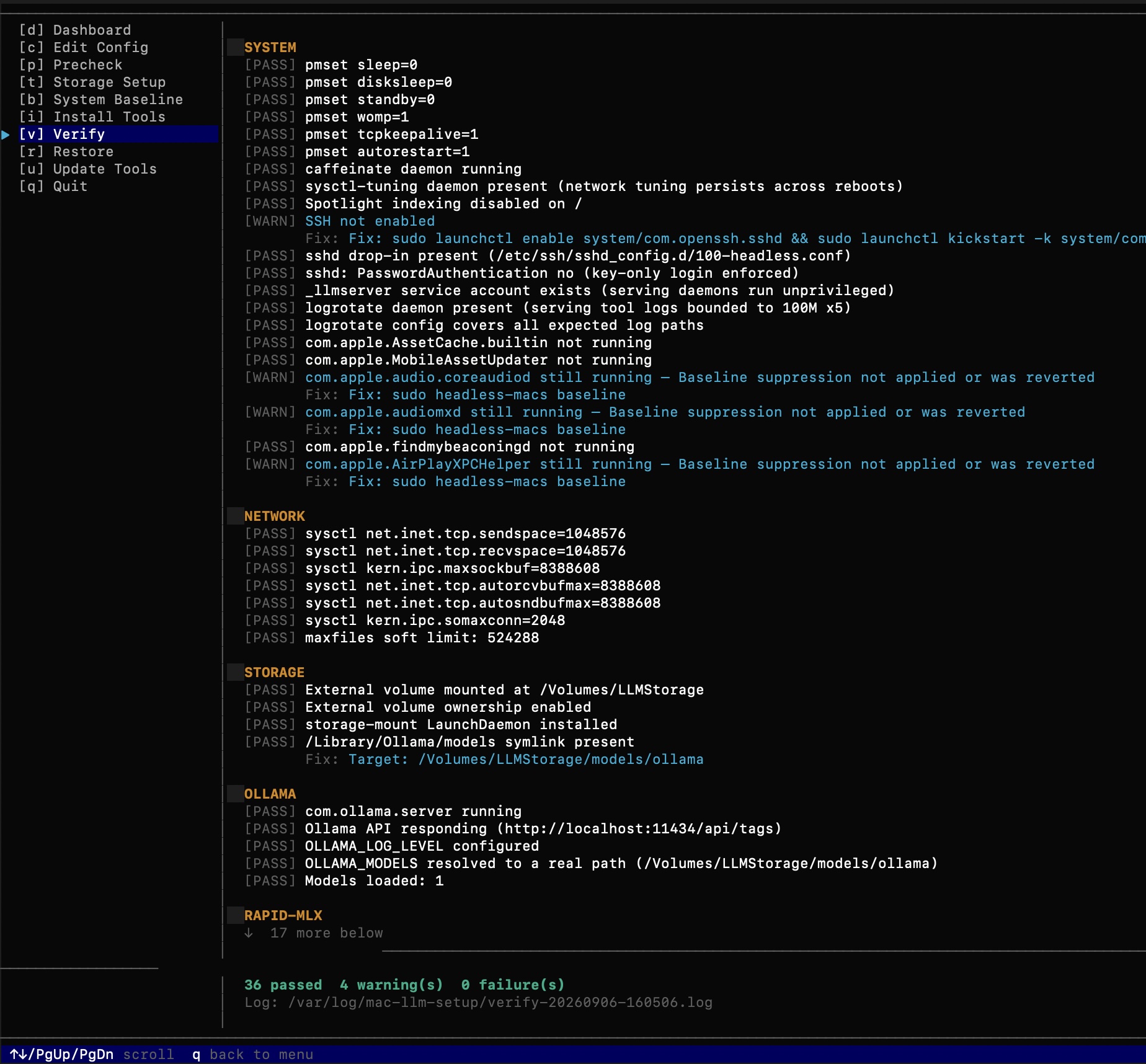
Verify checks every installed component and reports pass/warn/fail across system, network, storage, and each enabled serving tool:
See docs/ram-sizing.md for full model recommendations by hardware tier.
Register a Modelfile (optional)
A Modelfile bakes num_ctx and sampling parameters into a model’s metadata so clients see the correct context window — the Ollama UI’s context slider and OLLAMA_MAX_CONTEXT are both server-side only and invisible to clients (see docs/modelfile-guide.md).
ollama create <model-name> -f /path/to/your.modelfile

# Pin a model in memory to avoid cold-start delays
curl -s http://localhost:11434/api/generate \
  -d '{"model": "<model-name>", "keep_alive": -1}' > /dev/null
See docs/modelfile-guide.md for why this matters and the GGUF vs MLX distinction; see Ollama’s own Modelfile reference for the full parameter set.
Point a coding agent at Ollama
Base URL: http://<mac-ip>:11434/v1
API Key:  (any string — Ollama ignores it)
Model:    <the Ollama model name you pulled or created>
Note: VS Code Copilot agent mode has a known tool call loop bug with local GGUF models. Use Zoo Code for agentic tasks. See docs/known-issues.md.
Troubleshooting
Machine sleeps despite System Baseline
pmset -g | grep -E "sleep|disablesleep|powermode"
sudo ./headless-macs baseline          # CLI — idempotent, safe to re-run
sudo ./headless-macs                   # TUI → b (System Baseline)
Ollama daemon not starting
sudo launchctl print system/com.ollama.server
tail -50 /var/log/ollama/stderr.log
Update Ollama to the latest version
sudo ./headless-macs update-tools      # CLI
sudo ./headless-macs                   # TUI → u (Update Tools)
Run a health check
sudo ./headless-macs verify            # CLI — exits 0/1/2
sudo ./headless-macs                   # TUI → v (Verify)
Something went wrong — clean slate
sudo ./headless-macs restore           # CLI
sudo ./headless-macs                   # TUI → r (Restore), then reboot
Disable SIP (required for full service suppression on macOS 26 Tahoe — Apple Silicon)
System Baseline warns and runs safely with SIP enabled, but some service-disable calls need SIP off to persist across reboots.
- Shut down the Mac completely
- Press and hold the power button — keep holding until you see “Loading startup options” or a gear/Options icon appears
- Release the power button, then click Options → Continue
- Select your startup volume (Macintosh HD) → Next
- Select an admin user → enter password → Continue
- From the menu bar: Utilities → Terminal
- Run:
csrutil disablethen press Return - Restart:
reboot
To re-enable SIP: boot into Recovery the same way and run csrutil enable.
See docs/known-issues.md for a full workarounds table.
Contributing
Pull requests welcome. Please ensure:
go build ./...passes with no errorsgo vet ./...produces no warnings- New ops stages follow the
BaselineAction/XxxResultpattern ininternal/ops/ - New LaunchDaemon plists include
UserName _llmserver,HOME=/Library/LLMServer, and usebootstrap/bootout - All shell script changes are idempotent — running twice produces
[SKIP]for already-applied settings
License
See LICENSE.